
Download SubtitleGen – AI Subtitle Generation, Translation & Editing Tool
Overview & Core Features of SubtitleGen
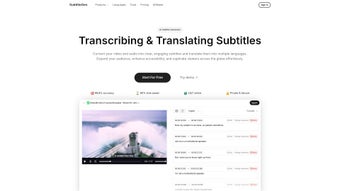
SubtitleGen is a cloud‑based AI platform designed to turn any video or audio file into perfectly timed subtitles in a matter of minutes. Powered by state‑of‑the‑art speech‑to‑text and neural‑machine translation engines, the service automatically transcribes spoken content, creates subtitle tracks, and translates them into over 30 languages. What sets SubtitleGen apart is its intuitive browser‑first workflow: simply drag‑and‑drop a media file, let the AI do the heavy lifting, and then fine‑tune the output with a built‑in online editor.
The editor supports real‑time preview, style customization, and batch export to popular formats such as SRT, VTT, and ASS. For businesses and content creators who prioritize data security, SubtitleGen employs end‑to‑end encryption, ensuring that uploaded media never leaves the secure processing environment. Whether you are a YouTuber looking to broaden your audience, an e‑learning provider adding accessibility, or a multinational corporation localizing training videos, SubtitleGen offers a fast, reliable, and cost‑effective solution.
Key Feature List
- AI‑driven transcription with 95%+ accuracy for clear speech.
- Automatic subtitle generation in 30+ languages.
- In‑browser subtitle editor with real‑time video preview.
- One‑click export to SRT, VTT, ASS, and TXT formats.
- Batch processing for multiple videos at once.
- Secure cloud storage with SSL/TLS encryption.
- Customizable styling (font, color, positioning) without code.
- Integration API for automated workflows (RESTful).
- Collaborative review mode for teams.
- Free tier with 30‑minute monthly quota; paid plans start at $9.99/month.
Installation, Setup & Daily Usage Guide
Because SubtitleGen is a fully web‑based solution, there is no traditional installation process. All you need is a modern browser (Chrome, Edge, Firefox, Safari) and an internet connection. Follow these steps to start generating subtitles instantly:
- Create an account: Visit subtitlegen.com, click “Sign Up,” and enter your email. A verification link will be sent to confirm your address.
- Choose a plan: The free tier lets you process up to 30 minutes of video per month. If you need more, upgrade via the dashboard; payment is processed securely through Stripe.
- Upload your media: From the dashboard, click “New Project,” then drag‑and‑drop a video file (MP4, MOV, AVI) or paste a YouTube/Vimeo URL. The platform supports files up to 2 GB on paid plans.
- Configure language settings: Select the source language for transcription and the target language(s) for translation. You can add multiple target languages in a single run.
- Start processing: Hit “Generate Subtitles.” The AI begins transcribing, timestamps, and translating. Progress is shown in real time.
- Edit in the browser: Once processing finishes, the subtitle track appears in the built‑in editor. Use the timeline to adjust timings, edit wording, or apply styling. The preview pane syncs automatically with the video.
- Export & share: When satisfied, click “Export.” Choose your desired format (SRT, VTT, ASS) and download the file or send it directly to cloud storage services like Google Drive or Dropbox.
Tip: For best accuracy, provide clear audio and avoid heavy background noise. SubtitleGen also offers a “Noise Reduction” toggle that preprocesses the audio before transcription.
Compatibility: Because SubtitleGen runs entirely in the browser, it works on Windows, macOS, Linux, Chrome OS, Android, and iOS devices. No additional plugins or desktop clients are required.
Pros & Cons, Followed by Frequently Asked Questions
Pros
- Fast AI transcription and translation without manual effort.
- All‑in‑one web editor eliminates the need for third‑party subtitle tools.
- Strong data security with end‑to‑end encryption.
- Scalable pricing – free tier for hobbyists, enterprise plans for large teams.
- Supports batch uploads, ideal for creators with many videos.
Cons
- Dependent on internet connectivity; offline work is not possible.
- Very long videos (>2 hours) may require manual splitting for faster processing.
- Advanced styling (e.g., animated karaoke effects) is limited to ASS format.
- Free tier caps at 30 minutes per month, which may be restrictive for frequent users.
Frequently Asked Questions
Is SubtitleGen really free to use?
Yes, SubtitleGen offers a free tier that includes up to 30 minutes of video processing per month. The free plan is perfect for testing the service or for occasional hobby projects. For larger workloads, paid plans start at $9.99 per month.
How secure is my uploaded video?
SubtitleGen uses SSL/TLS encryption for data in transit and AES‑256 encryption at rest. Uploaded files are stored only for the duration needed to process the subtitles and are automatically deleted after 48 hours, unless you choose to keep them in your personal workspace.
Can I integrate SubtitleGen into my existing workflow?
Absolutely. SubtitleGen provides a RESTful API that lets you programmatically upload media, trigger transcription, and retrieve subtitle files. This makes it easy to embed the service into content management systems, e‑learning platforms, or automated video pipelines.
Which subtitle formats does SubtitleGen support?
Export options include SRT (SubRip), VTT (WebVTT), ASS/SSA (Advanced SubStation Alpha), and plain TXT. All formats preserve timestamps and styling where applicable.
Does SubtitleGen work on mobile devices?
Yes. Since the platform is browser‑based, you can access it from any modern mobile browser on Android or iOS. The editor adapts to smaller screens, allowing you to edit subtitles on the go.
Overall Rating: 4.5/5 – SubtitleGen delivers a fast, secure, and user‑friendly subtitle generation experience that meets the needs of both casual creators and enterprise teams.
Conclusion – Should You Download SubtitleGen Today?
If you’re looking for a reliable, AI‑powered solution that removes the tedious manual work of captioning and translating video content, SubtitleGen is a top contender. Its web‑first design means you can start right away—no downloads, no installations, just a clean interface that guides you from upload to export in a handful of clicks. The built‑in editor, multi‑language support, and robust security measures make it suitable for educators, marketers, and multinational corporations alike. While the free tier is limited, the pricing structure scales sensibly, and the API opens doors for automation in larger production pipelines. In short, SubtitleGen offers a blend of speed, accuracy, and convenience that few competitors match.
Ready to make your videos more accessible and reach a global audience? Download SubtitleGen now by creating a free account, or upgrade to a paid plan for unlimited processing. Experience AI‑driven subtitles without compromising on security or quality.



.png)



